

The short answer
AI automation means using software tools to handle repetitive tasks, such as sending reminders or sorting form replies, and vibe coding means describing what you want in plain language so an AI tool writes the code. Many young people learn both on their own projects first, then offer small, testable tasks to one local business. The tools set their own minimum ages, from 13 to 18, so each tool's terms come first.
- Age guide From about 13; each tool sets its own minimum age, from 13 to 18
- Startup cost Low: a laptop and starter-level tools
- Time Flexible hours; learning comes before the first client
- Skill level Patience for testing matters more than speed
Free one-page starter sheet (PDF)
This article is general information for founders, not legal, tax, or financial advice. Rules, fees, and filing requirements vary by state and change over time. Nothing here creates a professional relationship of any kind. Confirm anything that affects your business with your state's filing office and a qualified attorney or accountant before you act on it.
Many young founders involve a parent or guardian from the start, since rules about contracts, bank accounts and online accounts often depend on age.
What are vibe coding and AI automation?
Two terms get mixed up. Vibe coding is describing what you want in everyday language and letting an AI tool write the code. Merriam-Webster defines it as “writing computer code in a somewhat careless fashion, with AI assistance,” and says the word is believed to have been coined by Andrej Karpathy in a post on X dated 2 February 2025. In that post he called the approach “not too bad for throwaway weekend projects.” Collins Dictionary named vibe coding its Word of the Year for 2025.
Automation is a different thing: connecting apps so that a repetitive task runs by itself. Zapier’s help center describes a “Zap” as a workflow that connects your apps to automate repetitive tasks, built from a trigger that starts it and one or more actions. Make describes a scenario as a series of modules that show how data moves between apps, and n8n describes itself as a workflow automation tool that combines AI features with business process automation.
Put together, the idea is simple: a young person learns these tools on their own projects, then helps a local business with one small, checkable task. The same skills can lead to simple websites, spreadsheets that fill themselves in, and reminder messages. Because the tools are new and change quickly, the honest framing is “learning a skill” before “running a business”.
How do you start an AI automation business?
The order below is a typical flow, not a rule. Some founders find a client first and learn the tool afterward.
-
Learn on your own projects first
Many people build something small for themselves, such as a reminder, a spreadsheet helper or a one-page website, to learn how the tools behave and where they go wrong. The person who coined the term vibe coding called it not too bad for throwaway weekend projects.
-
Check each tool's age rules and data settings
Tools publish their own minimum ages, and some use what you type or paste to improve their models unless an account setting is changed. Reading the terms first avoids building on an account that is not allowed.
-
Pick one small, repetitive task
Good first tasks are boring and easy to check, such as copying new form replies into a spreadsheet or sending an appointment reminder. Zapier describes a workflow as a trigger that starts it plus one or more actions.
-
Test on made-up data
Before an automation touches a real customer list, many builders run it on dummy records, keep an off switch and check it again a week later.
-
Offer it to one local business
A shop or team that already knows the founder is a common first client. Explaining in plain words what the tool does, which accounts it touches and how to switch it off builds trust.
-
Check the paperwork with an adult
Client agreements, payment accounts and tax questions often depend on age and location. A parent or guardian, the city or county business office and an accountant can say what applies.
What do you need to start an AI automation business?
Most young founders begin with a short list and add tools only once clients are asking for more.
Many people start with
- A laptop and a reliable internet connection
- An account on one AI coding or app-building tool whose age rules are met
- An account on one automation tool, such as Zapier, Make or n8n
- A notes file: what was built, which accounts it uses, how to switch it off
Often added later
- A password manager and two-step sign-in on every account
- A portfolio page of small finished projects
- A written client agreement, reviewed by a parent or guardian
- Business registration and simple branding
Is AI automation a good fit for you?
Often a good fit if you
- like working out how things fit together and do not mind trial and error
- enjoy explaining technical things in plain language
- know a local business owner with a repetitive task
Worth thinking twice if you
- want results without testing, since AI-written code can be wrong or insecure
- would not want responsibility for a client's customer data
- are under a tool's minimum age and have no parent or guardian to help
What could a young founder build or automate for a local business?
These are examples of small, testable tasks that people describe, not a promise that any of them suits a particular business.
- Reminders. An appointment or booking reminder sent by text or email.
- Form replies. New contact-form or email inquiries copied into a spreadsheet, so none are missed.
- A simple page. A one-page website, menu or price list that the owner can update.
- A weekly summary. A short report of the week’s orders or messages sent to the owner.
- Follow-ups. A thank-you or review request after a job, with a way for people to opt out.
Each one is easier to check than a large project, which is why many builders start there.
How old do you have to be to use AI coding and automation tools?
The tools publish different minimum ages, and the numbers range from 13 to 18. The list below is as of October 2026, and terms change, so each tool’s own page has the current rule.
| Tool | What its published terms say |
|---|---|
| GitHub | Users must be 13 or older. Students enrolled in a degree- or diploma-granting program, including high school or homeschool, who are at least 13 can apply to GitHub Education, which gives verified students free access to Copilot’s features. |
| Replit | At least 13, and under 18 requires a parent or guardian’s permission. |
| OpenAI (ChatGPT) | OpenAI’s Teen Safety Blueprint (November 2025) says ChatGPT is for individuals 13 and older. |
| 13 is the minimum age to manage your own Google Account in countries that do not list a different age; using Gemini with a work Google Account requires being 18 or over. | |
| Anthropic (Claude, consumer) | At least 18, or the minimum age to consent where you live, whichever is higher. |
| Cursor | 18, or the age of majority where that is higher. |
| Lovable | At least 18 or the age of majority, and the same section says users under 18 need a parent or legal guardian’s permission. |
| Zapier | The terms ask for legal capacity to enter contracts, and the privacy statement says the services are not intended for children under 16. |
| Make | Make Academy’s terms say 18 or the age of majority. |
Age rules for accounts are separate from age rules for contracts. A tool’s terms may allow an account, while a client agreement or a payment account can still depend on age, which is one more reason many young founders involve a parent or guardian.
What are the security and privacy risks?
AI-written code can look right and still be wrong. The UK’s National Cyber Security Centre says different code deserves different levels of oversight and warns of “a real risk” of security vulnerabilities when an AI works on a code base with minimal oversight; its examples of higher-stakes code are login logic, code that processes sensitive customer data and anything handling secret tokens or credentials. Georgetown University’s CSET reported in November 2024 that, under experimental conditions, AI code generation models frequently output insecure code. OWASP’s 2025 list of risks for AI applications describes prompt injection, where user input changes a model’s behavior in unintended ways, and “excessive agency,” where damaging actions follow from unexpected or manipulated model output. That last one matters for automations that can send messages or change records on their own.
Client data adds a second layer. The FTC’s guide for businesses is built on five principles: take stock of what personal information you have, keep only what you need, lock it, dispose of what you no longer need, and plan for incidents. Tools also differ in how they treat what you paste into them: Anthropic’s consumer terms say it may use content for model training unless you opt out in account settings, while its commercial terms say it may not train models on customer content from its services, and Google’s Gemini Apps privacy page asks users not to enter confidential information they would not want a reviewer to see. Many builders therefore use made-up data while testing and keep real customer information out of public chats and public code repositories.
What rules might apply to an AI automation business?
The details depend on the state and the work, and a quick conversation with a parent or guardian and the local business office is a common first step.
- Email and text follow-ups. The FTC’s CAN-SPAM guide says the law covers commercial email with no exception for business-to-business messages, that both the company whose product is promoted and the company that sends the message may be held responsible, and that opt-out requests must be honored within 10 business days.
- Customer data. The FTC notes that all states, the District of Columbia, Puerto Rico and the Virgin Islands have laws requiring notification of security breaches involving personal information. If a client’s tool collects personal information from children under 13, the FTC’s COPPA rule may also apply.
- Registration and taxes. The SBA says local governments determine registration, licensing and permitting requirements. The IRS says people generally owe self-employment tax if they have net earnings of $400 or more, no matter how old they are (as of October 2026; confirm current figures with the IRS).
- Work rules for young employees. Federal child labor rules list computer programming and writing software among types of work that 14- and 15-year-old employees may do, subject to hours limits. That concerns employment, not running a business.
Questions to ask before the first client
People commonly put questions like these to the local business office, a parent or guardian, and the client. The list is not complete, and the answers vary by place and by tool.
- Does the city or county ask a computer or technology services business, including a home-based one, to register or hold a license?
- Does the state or city charge sales tax on services like this, or only on products?
- Does each tool's terms of service allow someone of this age to hold an account, and may the account be used for client work?
- Who owns the finished project, and who holds the logins when the work ends?
- What customer data would the project touch, and where would it be stored?
How do AI automation freelancers work out a price?
Pricing is arithmetic more than a guess. A common approach is to add the tool and hosting costs of one project to the time it takes, including testing and handing it over, multiplied by the hourly pay the founder wants, then compare the result with what nearby freelancers charge. Many founders start with one small project at a low-risk price to learn how long things really take. This guide gives no figures because they vary widely.
What can go wrong?
The honest answer is that a tool can do exactly what you asked and still be wrong. An automation that sends the wrong message to every customer on a list, or code that exposes someone’s data, becomes the builder’s problem even when an AI wrote it. Promising what a tool cannot reliably do, building everything under a personal account so the owner cannot take over, and skipping the tool’s own age and account rules are the other common problems. Starting with one small task, testing on made-up data, keeping a note of what was built and how to switch it off, and having a parent or guardian involved in agreements and payments matter more than knowing the newest tool.
Frequently asked questions
What is vibe coding?
Merriam-Webster defines vibe coding as writing computer code in a somewhat careless fashion, with AI assistance, and says the word is believed to have been coined by Andrej Karpathy in a post on X dated 2 February 2025. Collins Dictionary named it its 2025 Word of the Year. In practice it means describing what you want in plain language and letting an AI tool write the code.
How do you start an AI automation business?
Many people start by learning the tools on their own projects, picking one small repetitive task, testing it on made-up data and offering it to one local business that already knows them. Tool age rules, client data privacy and contract rules for minors vary, so many founders check each tool's terms and involve a parent or guardian.
How old do you have to be to use AI coding and automation tools?
It differs by tool. As of October 2026 GitHub says 13, Replit says 13 with a parent or guardian's permission under 18, Anthropic's consumer terms and Cursor say 18, Lovable's terms mention both 18 and parental permission, and Zapier's privacy statement says its services are not intended for under 16. Terms change, so each tool's own page has the current rule.
Is vibe coding safe to use for a business?
The UK's National Cyber Security Centre says different code deserves different levels of oversight, and warns that when an AI works on code with minimal oversight there is a real risk of security vulnerabilities, naming login code, customer data and credentials as higher-stakes examples. Many builders therefore use AI-written code for low-stakes projects and review and test anything that touches customers.
More business ideas to look at

Social media help for local shops
Help a local shop plan, post and reply on social media.

Tutoring
Help other students learn a subject you already know well.

Reselling
Sell used or secondhand items online or locally for more than they cost.
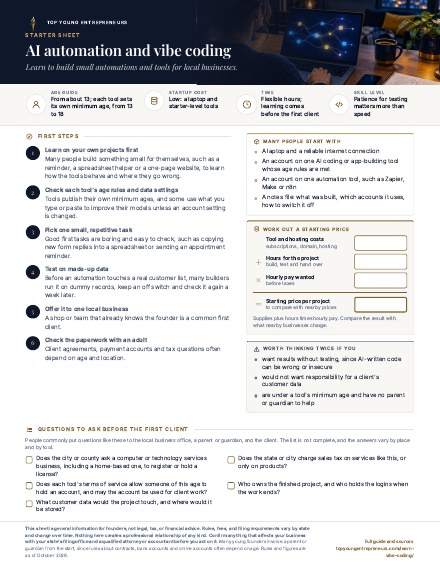
Free download
AI automation and vibe coding: the one-page starter sheet
The first steps, a starter kit, a simple price worksheet and the questions worth asking locally, on one easy-to-print page.
Keep reading
- LLC vs. sole proprietorship How the two structures compare, described without telling you which to pick.
- The LLC formation checklist A map of the typical stages if a business grows into a company.
- How to get an EIN What the IRS's free business number is, who applies for one and the steps, from the IRS's own pages.
- How to start a business in Nevada The LLC steps, state fees, forms and local licenses in one state, with a printable checklist.
- The best states to start a business in 2026 A sourced comparison of state taxes and filing fees.
- Founders we have profiled Real people who built companies young, independently verified.
- How Top Young Entrepreneurs works Our editorial standards and how we source facts.
This article is general information for founders, not legal, tax, or financial advice. Rules, fees, and filing requirements vary by state and change over time. Nothing here creates a professional relationship of any kind. Confirm anything that affects your business with your state's filing office and a qualified attorney or accountant before you act on it.
Many young founders involve a parent or guardian from the start, since rules about contracts, bank accounts and online accounts often depend on age.
- Merriam-Webster: vibe coding: definition and origin of the term
- Andrej Karpathy's post on X, 2 February 2025: the post that introduced the term
- Collins Dictionary: Word of the Year 2025: Collins' announcement
- Zapier Help Center: What is a Zap?: triggers and actions
- Make Help Center: Create your first scenario: how Make describes a scenario
- n8n documentation: how n8n describes itself
- GitHub Terms of Service: minimum age (effective April 2026)
- GitHub Education: Apply as a student: student eligibility, including high school and homeschool
- Replit Terms of Service: minimum age and parental permission (updated August 2026)
- Anthropic Consumer Terms of Service: minimum age and how content may be used
- Cursor Terms of Service: minimum age (updated September 2026)
- Lovable Terms of Service: minimum age and parental permission (updated August 2026)
- Zapier Privacy Statement: age statement for its services
- UK National Cyber Security Centre: The vibe coding spectrum: oversight and security risks (June 2026)
- FTC: Protecting Personal Information, a guide for business: five data security principles
- FTC: CAN-SPAM Act compliance guide for business: rules for commercial email, including automated follow-ups
Last verified: October 1, 2026. Rules, fees and age limits change, so confirm current details with the source before acting on them. This article is educational, not legal, tax or financial advice.